 SwitchMiner
Know what’s plugged into every port.
SwitchMiner scans your Cisco switches over SNMP and lists every device on every port: MAC address, IP address, computer name, VLAN and more. Then it exports the whole map to Excel or CSV. Version 5 runs on Windows and Linux.
Free and open source (GPLv3). Rated 4.8 out of 5 from 5 reviews on SourceForge.
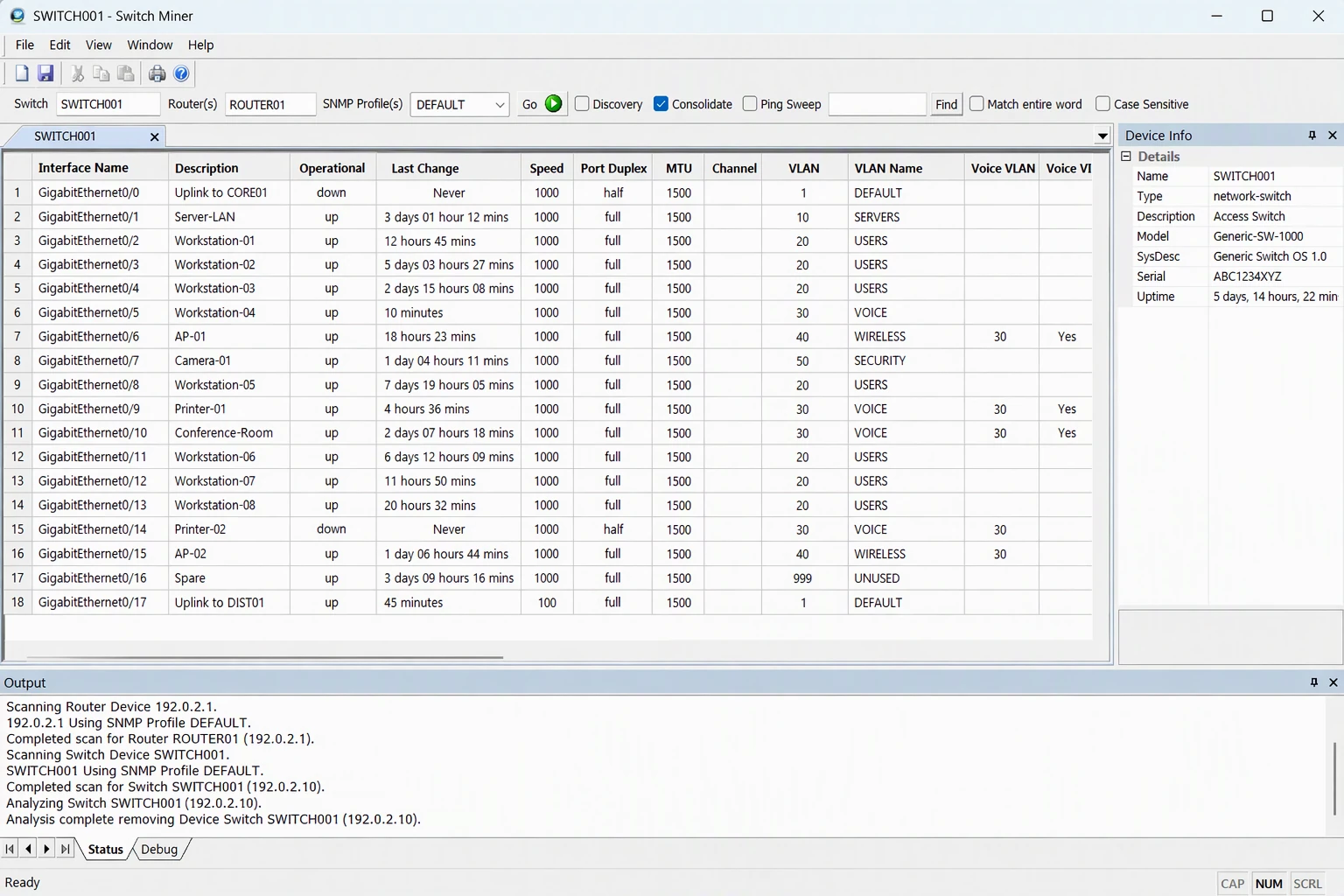
From one switch address to a full port map
Give SwitchMiner a switch and it does the walking. It follows CDP to neighboring switches, so a whole closet or floor can be mapped from a single starting point.
-
Point it at your switches
Scan one switch, or load a text file with a batch of them. Several switches are scanned at the same time, and you choose how many threads to use. If you have routers, SwitchMiner can also fill in IP addresses and computer names.
-
It reads them over SNMP
SNMP v1, v2c and v3 are supported, including MD5 and SHA authentication and DES and AES (128, 192 and 256-bit) privacy. SwitchMiner pulls port status, VLANs, trunks and the MAC addresses on each port, then looks up IP addresses and computer names.
-
It follows CDP neighbors
Neighboring switches are discovered through CDP and scanned too, with no need to list them by hand. Exclude patterns keep it from wandering into devices you don’t want scanned.
-
You get a spreadsheet
Results are saved as an Excel workbook with one sheet per switch, or as a .csv file, ready to sort, filter and share.
Scan many switches, then export
Each switch gets its own tab, and the scan runs on all of them at once. With Discovery turned on, SwitchMiner also finds neighboring switches through CDP and scans them too. When it finishes, save the results to Excel or CSV.


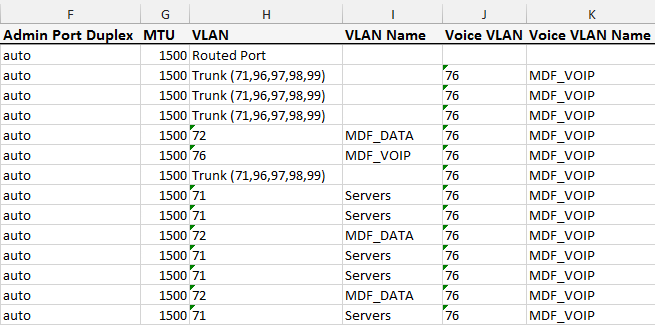
The exported Excel workbook, shown in two halves.
Prefer the command line?
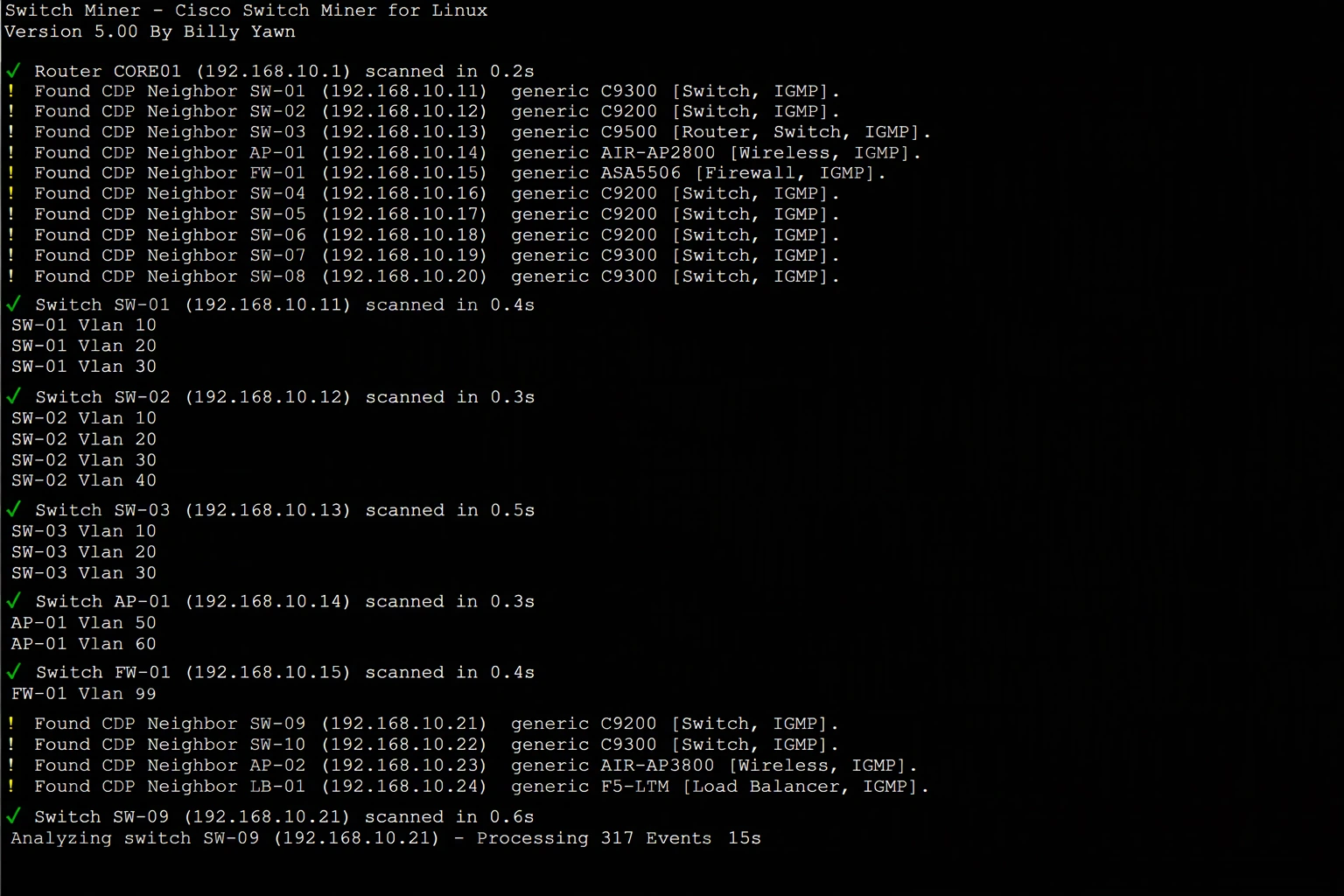
The Linux and Windows console versions look identical. Both run in a terminal and report each switch as it is scanned, along with every neighbor they find through CDP. The Linux version is a single portable program with nothing to install.
What SwitchMiner finds on each port
The port
- Interface name and description
- Operational status and last change
- Speed and duplex, operational and admin
- Interface MTU
- Interface errors
VLANs
- VLAN number, data and voice
- VLAN name, data and voice
The devices on it
- Every MAC address, so you see the PC and the phone behind it
- OUI manufacturer
- IP addresses
- DNS and NBT computer names
- User and domain info
Neighbors and scanning
- CDP neighbor details for uplinks and connected switches
- Ping sweep before the scan
- Uplink port consolidation
- Search for one MAC address to find its switch port
What network engineers say
Best Cisco switch port mapping program out there! THIS ONE WORKS.
This program works - and fast.
Works great, helped me debug a switch.
Release news
Older notes and every download are on the SourceForge news page.
SwitchMiner 5.00
One code base, three programs: a Windows GUI with saved SNMP profiles and one tab per switch, a Windows command-line version, and a portable Linux command-line version that needs no installation. Read the full announcement.
SwitchMiner 4.21
Fixed a bug with certain switch models running IOS versions that mishandle unsupported OIDs, and fixed a crash.
SwitchMiner GUI 4.20
Added a device info sidebar and fixed various bugs.
SwitchMiner GUI 4.10
Added support for SNMP v3 and fixed various other bugs.
SwitchMiner GUI 4.00
A Win32 GUI version of the product.
Common questions
Quick answers about mapping switch ports with SwitchMiner. For anything else, ask on the discussion board.
How do I find which switch port a device is plugged into?
Scan the switch with SwitchMiner. It reads the MAC addresses learned on every port over SNMP and matches them to IP addresses and computer names, so you can see what is on each port. To look up a single device, use the --search option with its MAC address.
How do I map all the ports on a Cisco switch?
Enter the switch address and your SNMP community or v3 credentials, then scan. SwitchMiner lists each port with its status, speed, duplex, VLAN and the devices behind it, and saves the result as an Excel or CSV file.
Can it scan many switches at once?
Yes. Load a text file with a list of switches and choose how many threads to use. With CDP discovery turned on, SwitchMiner also finds neighboring switches and scans them.
Which SNMP versions does it support?
SNMP v1, v2c and v3, including MD5 and SHA authentication and DES and AES (128, 192 and 256-bit) privacy. If you use v3, the switch needs a group with a “vlan-” context match prefix, or very few MAC addresses will come back.
What file formats can it export?
Excel (.xlsx), as one workbook with a sheet for each switch, and CSV. The Windows GUI can also save results as text.
Does SwitchMiner run on Linux?
Yes. Version 5 includes a single portable command-line program for Linux that needs no installation. It requires x86_64 and glibc 2.28 or newer.
Is it free?
Yes. SwitchMiner is open source under the GNU General Public License version 3, and the source code is available to download.
Get SwitchMiner
Version 5.00, released October 30, 2026. Free for everyone, licensed under the GNU General Public License version 3.
-
Download for Windows
Windows
The Windows GUI (
smgui.exe) and the command-line program (sm.exe). 7.7 MB zip. -
Download for Linux
Linux
A single portable command-line program (
sm) with nothing to install. Needs x86_64 and glibc 2.28 or newer, which covers RHEL, Rocky and Alma 8+, Ubuntu 20.04+, Debian 10+, Fedora and openSUSE. 3.3 MB. -
Download source
Source code
The 5.00 source as a tar.gz, 1.2 MB. A SHA256 checksum file is available to verify your downloads.
Looking for an older release? Version 4.x and all other files are still on SourceForge.